This is a companion deep-dive to our Ghost Phishing / EvilTokens write-up. That post explained why the technique defeats email filtering and ordinary MFA. This one walks through an actual email we received and investigated, screen by screen, then turns it into detection and hardening you can deploy today.
The thing that should worry you
We pulled a phishing email out of a mailbox this week. It did not carry a malware attachment. It did not link to a cloned Microsoft login page. Our URL reputation feeds returned clean. And if the recipient had followed every instruction on screen, the attacker would have walked away with a fully authenticated Microsoft 365 session — without ever seeing the password, and without the recipient's MFA slowing them down at all.
This is device code phishing: abuse of Microsoft's OAuth 2.0 device authorization grant. It is the same class of attack behind the Storm-2372 campaign Microsoft attributed to a Russia-aligned actor, and behind the financially motivated waves that followed through late 2025 and into 2026. What makes it worth a full write-up is not novelty — it is that every reflex most defenders rely on fails here, and fails quietly.
The captured flow, step by step
Here is exactly what we observed, mapped to what was happening behind the scenes.
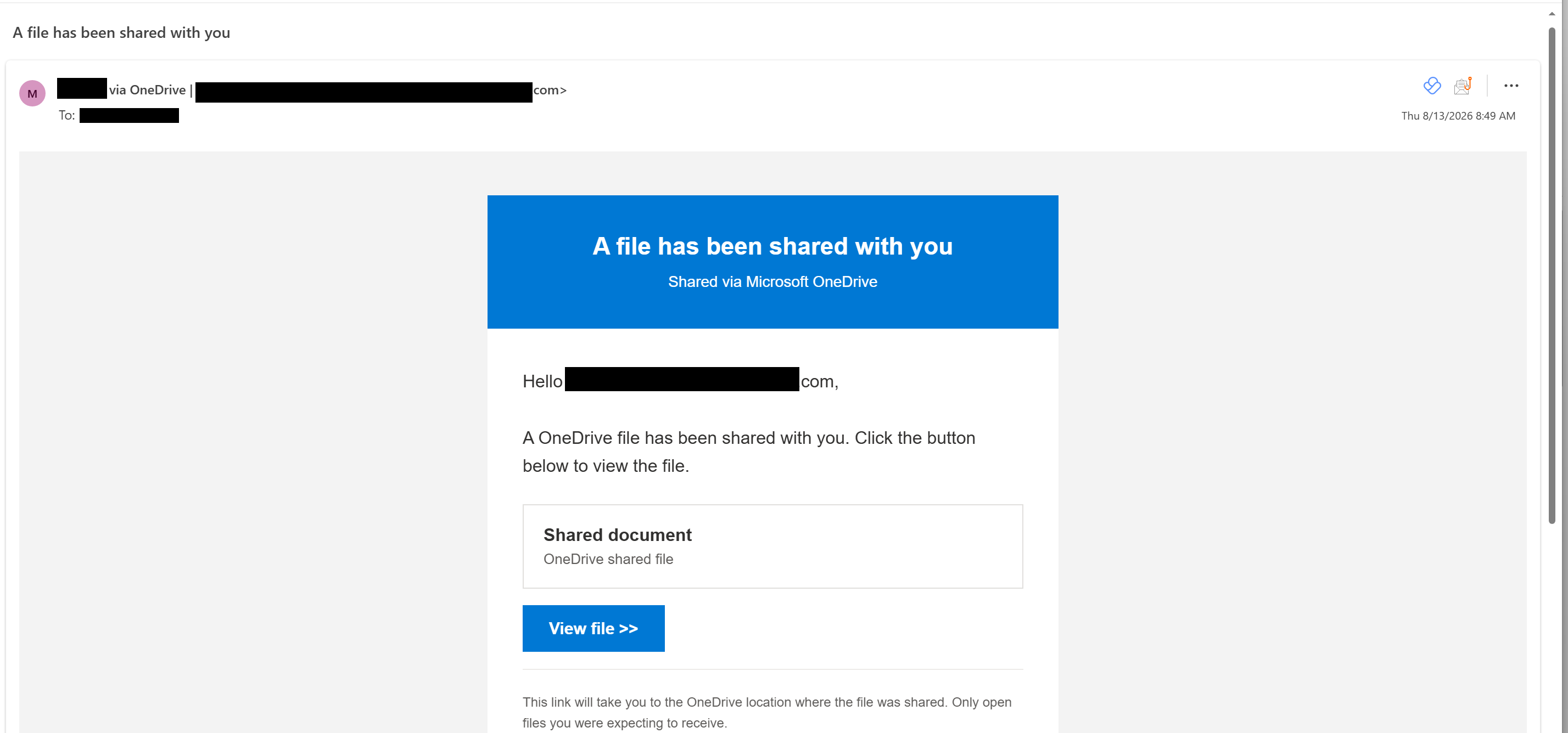
1. An HTML email with a single link
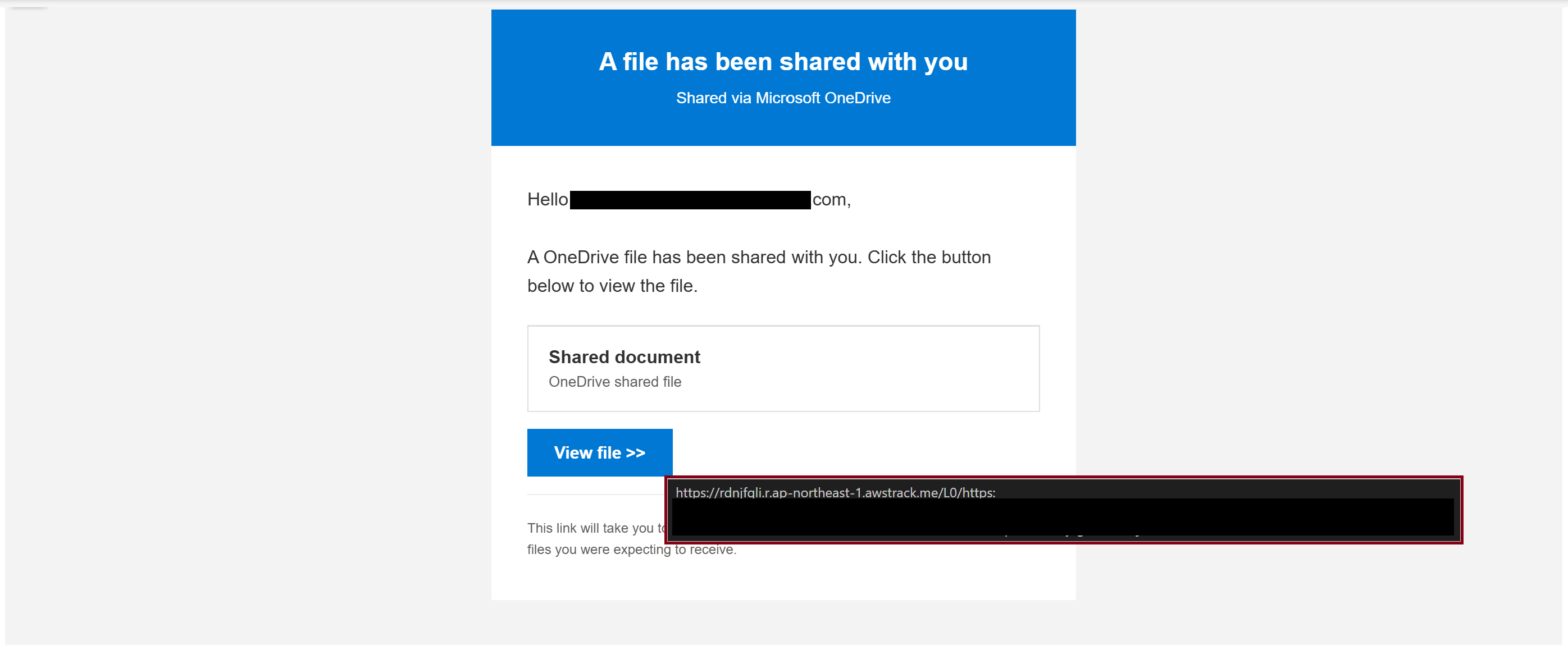
The lure was a well-formed HTML email — a shared-document or account-verification pretext with one call-to-action link. Nothing downloads. The link text showed a familiar-looking address; the real destination was somewhere else entirely. In the wild, that destination is routinely a page on a trusted host (Google Sites, a compromised legitimate site, or a Cloudflare Workers subdomain) reached through an open redirect — precisely so email gateways and URL scanners see reputable infrastructure and wave it through.
2. A Cloudflare "hold the button to continue" gate
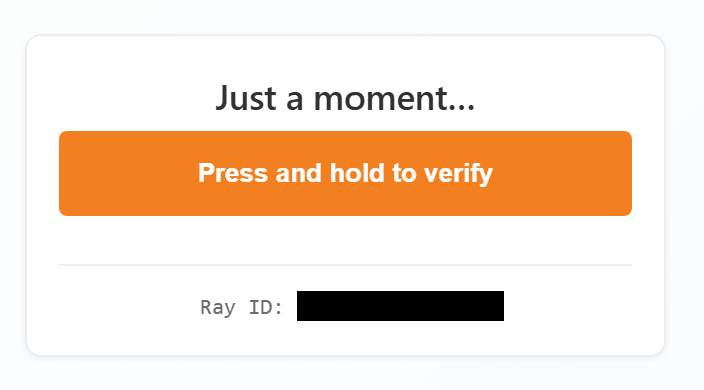
Click the link and you land not on a login page but on a human-verification challenge — a Cloudflare Turnstile-style interstitial where you press and hold a button to proceed. This is not there to protect you. It is an anti-analysis gate. Automated crawlers, sandbox detonation engines, and security-vendor scanners either cannot complete the interaction or are filtered out by IP, geolocation and User-Agent checks behind it. Real humans pass; the tooling that would flag the page never sees what comes next. It is the same delayed-activation logic that shows researchers benign content and targets the payload.
3. A Microsoft device code, with instructions to copy it
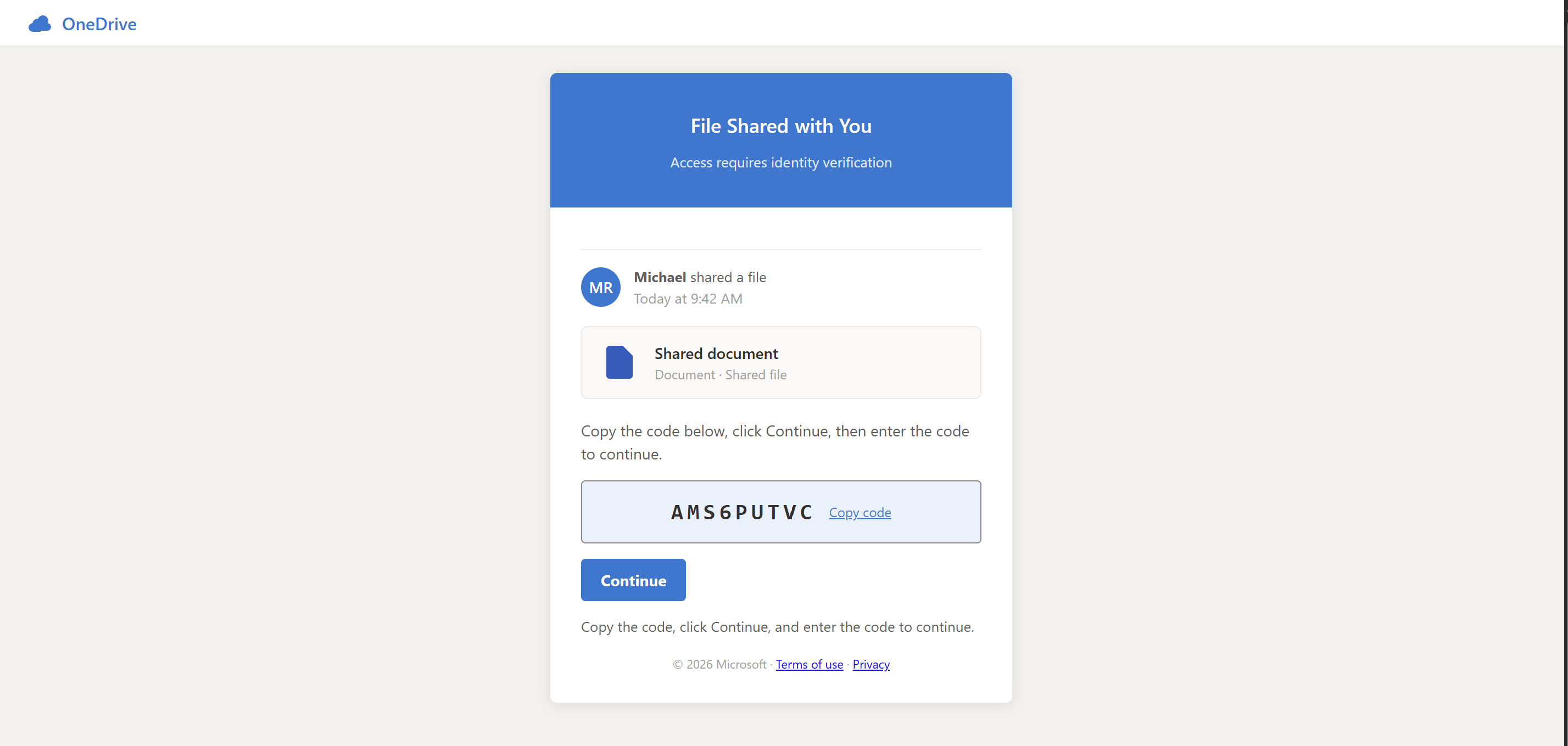
Past the gate, the page presents a short alphanumeric device code and clear instructions: copy this code, open the Microsoft sign-in page, and paste it in. Many kits auto-copy the code to your clipboard so the paste step feels effortless and legitimate. Crucially, that code is real. Seconds earlier, the attacker's server made a genuine device authorization request to Microsoft's token endpoint and received a live user_code / device_code pair. The page is simply relaying Microsoft's own code to you.
4. The real Microsoft sign-in page
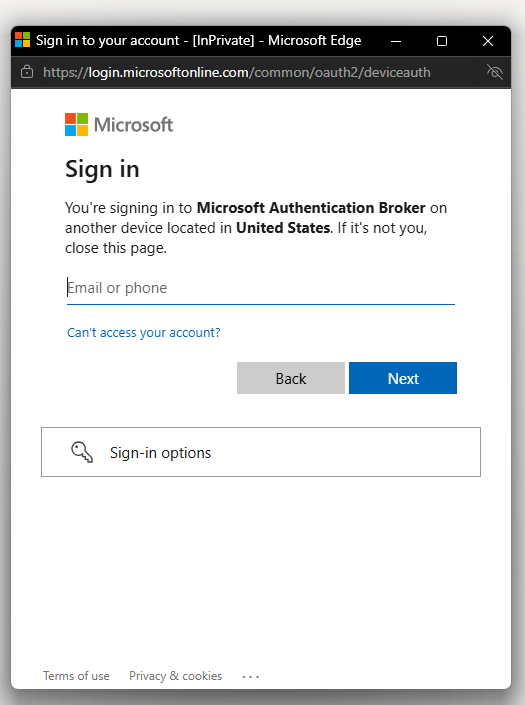
Paste the code at microsoft.com/devicelogin (or login.microsoftonline.com/common/oauth2/deviceauth) and you are on the genuine Microsoft page. Real domain. Valid TLS certificate. The actual Entra ID sign-in experience. There is nothing visually wrong because nothing is faked — you are authenticating to Microsoft, exactly as their documentation tells you to when pairing a device.
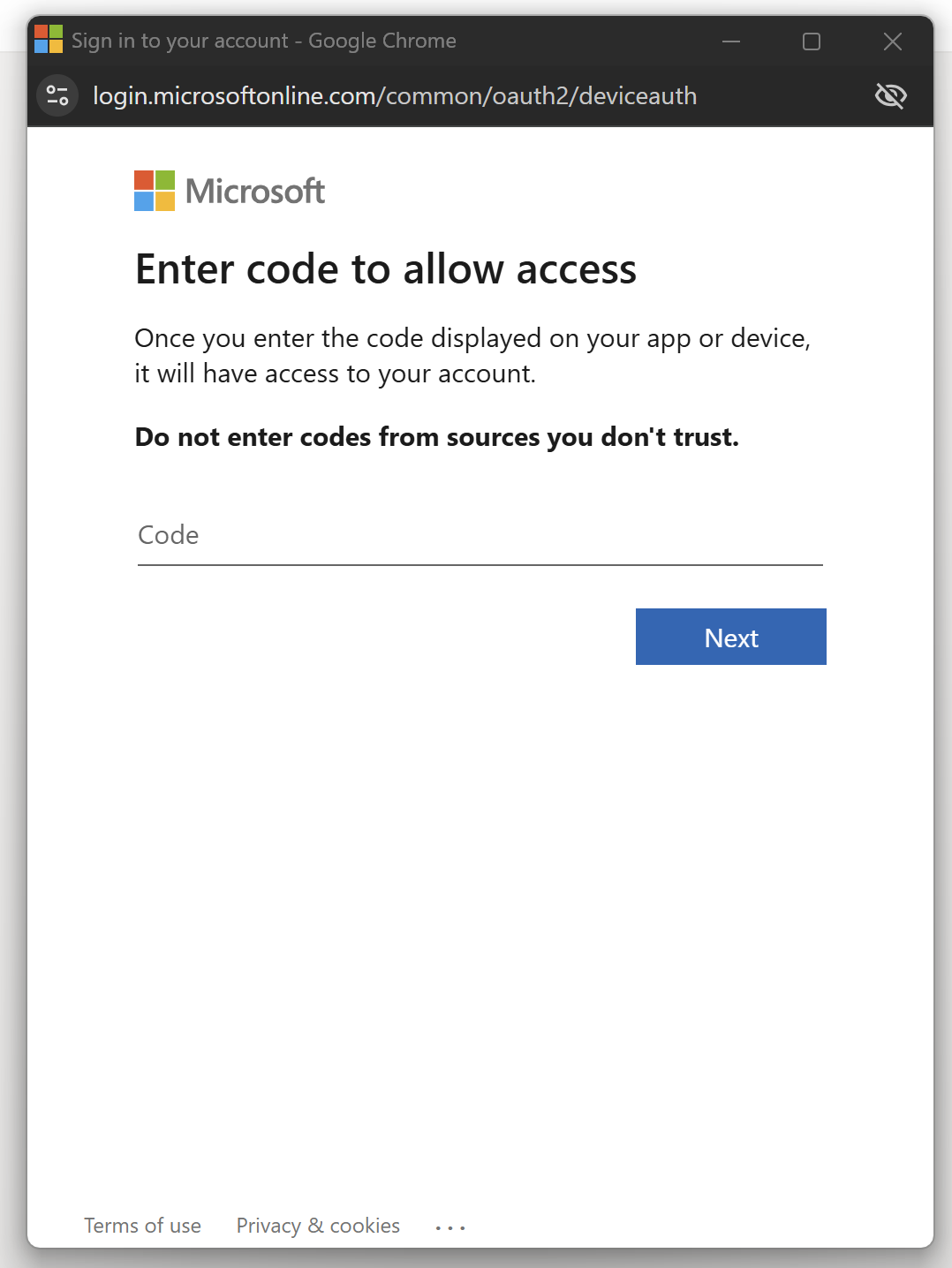
5. Credentials entered — and MFA is quietly satisfied for the attacker
The victim enters the code and, notably, is often not prompted for MFA at all. It is worth being precise about why, because the popular explanation ("the device code flow skips MFA") is wrong: the device code flow honours Conditional Access and can require MFA. The real reason is session reuse. Most people already have an active, MFA-satisfied Microsoft session in their browser during the workday; when the victim submits the attacker's code, Entra reuses that existing session's already-satisfied MFA claim to authorise the token, so no fresh challenge appears.
If the victim had no existing session, they would simply complete a genuine MFA prompt instead — and the outcome would be identical. Either way, once the pending device authorization is approved, Microsoft issues the access and refresh tokens to the party that started the flow — the attacker's server. The device code is what routes that token to the attacker; the missing MFA prompt is a symptom of SSO session reuse, not a flaw in the flow. MFA did its job perfectly — it just silently vouched for the wrong session.
Why the device code flow exists — and why that is the whole problem
The device authorization grant is a legitimate, sensible feature. Some devices cannot show a normal login page or have no keyboard — smart TVs, conference-room systems, CLI tools. So instead of typing a password on that device, you are handed a short code and told to finish signing in on a second screen. The unspoken assumption baked into that design is that the device requesting access and the person approving it are the same party, in the same room. Device code phishing breaks exactly that assumption. The attacker plays the input-limited device from anywhere in the world; the victim, believing they are verifying a document, plays the trusted human at the second screen.
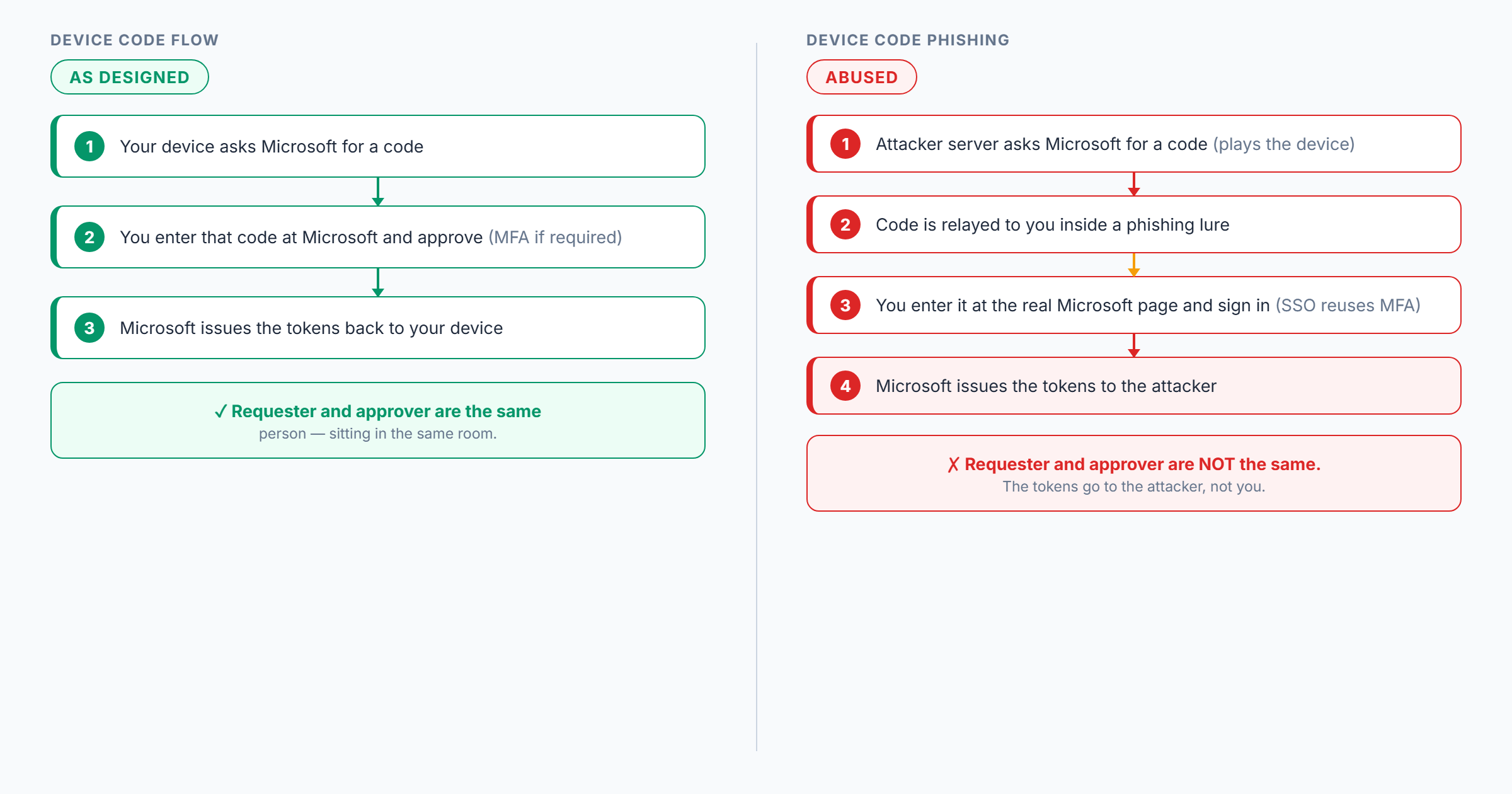
Nothing here is a software vulnerability. There is no CVE to patch. It is a legitimate flow, a trusted login page, and a believable story — combined into an attack that sidesteps the one control most organisations lean on.
What the attacker does next
A stolen session is the beginning, not the end. Consistent with the cases Microsoft, Proofpoint and Trend Micro have documented, the post-compromise playbook looks like this:
- Register a rogue device. When the attacker targets the Microsoft Authentication Broker client, a single approval yields a refresh token used to register an attacker-controlled device in Entra ID and obtain a Primary Refresh Token (PRT) — turning one sign-in into durable, long-lived access.
- Mine the mailbox. Using Microsoft Graph, actors search compromised mailboxes for keywords such as password, admin, credentials, secret, teamviewer and anydesk, and exfiltrate the hits.
- Hide the tracks. A new inbox rule quietly moves replies and non-delivery reports to an obscure folder, so the real owner never notices.
- Spread laterally. The mailbox sends the next wave of lures internally and externally — now arriving from a real, trusted colleague.
The endpoint is never touched. Everything happens in the cloud, off the victim's machine — which is why EDR alone will not see it.
Why every ordinary defence missed it
| Control you rely on | Why it failed here |
|---|---|
| Email URL reputation / sandboxing | First hop is a trusted host via open redirect; the Cloudflare hold-gate blocks automated detonation. |
| "Check the domain is really Microsoft" training | The sign-in domain is really Microsoft. The advice is satisfied and the user still loses. |
| Multi-factor authentication | MFA is completed for real — by the victim, on the attacker's behalf. The token is issued post-MFA. |
| Endpoint detection | No payload runs on the endpoint; the takeover is entirely in the identity plane. |
The signal did not disappear. It moved — from the email and endpoint layers, where most tooling watches, to the identity layer, where far fewer teams are actively hunting.
Detection: hunt in the identity layer
Because the attack lives in Entra ID, that is where you catch it. Device-code sign-ins should be rare and explainable in most tenants, which makes them high-signal to alert on. Watch for:
- Sign-ins using the device code authentication protocol, especially to the Microsoft Authentication Broker app, from an unfamiliar country, ASN or unmanaged device.
- New device registrations — several in a short window, or from unfamiliar IPs.
- New inbox rules that move mail to obscure folders, mark it read, or delete it.
- Atypical / impossible travel on a successful sign-in correlated with the above.
- Users who clicked a link containing microsoft.com/devicelogin or .../oauth2/deviceauth shortly before a successful sign-in.
A Sentinel / Log Analytics starting point (tune before alerting):
SigninLogs
| where AuthenticationProtocol == "deviceCode"
| where ResultType == 0
| project TimeGenerated, UserPrincipalName, AppDisplayName,
          IPAddress, Location, DeviceDetail, ResourceDisplayName
| sort by TimeGenerated desc
Pair it with a second hunt for new device registrations whose original transfer method was the device-code flow — that correlation separates a benign smart-TV pairing from an account takeover in progress.
Hardening: make the flow unavailable where it is not needed
No single toggle solves this. Layer it, starting with the highest-value control.
- Block the device code flow with Conditional Access. The single highest-impact move. Most organisations do not legitimately need device-code sign-in for most users. Use a Conditional Access authentication-flows policy to block it broadly and carve out narrow, named exceptions.
- Move to phishing-resistant MFA. FIDO2 keys, passkeys and Windows Hello for Business are origin-bound and remove the "user approves the wrong session" failure mode — start with admins and high-value mailboxes.
- Constrain devices. Limit who can register devices, require managed / compliant devices for mail and data, and lower the per-user device limit.
- Tighten the identity perimeter. Enforce named-location policies, enable Continuous Access Evaluation and token protection, and auto-revoke sessions when risk rises.
- Teach one rule. Never enter or read out a code that someone else gave you into a Microsoft login page. Legitimate device-code pairing is something you initiate on your device — never something an email, document or "support agent" asks you to do.
Mitigating and compensating controls
The five steps above are the core program. The matrix below is the fuller control set, organised by function and mapped to the stage of the attack it breaks — so you can layer defence in depth and, where you cannot apply the primary control (blocking the device-code flow outright), reach for a compensating control instead.
| Control | Type | Attack stage it breaks |
|---|---|---|
| Conditional Access — block the device code authentication flow (allow only named exceptions) | Preventive | Removes the mechanism entirely |
| Phishing-resistant MFA (FIDO2, passkeys, Windows Hello for Business), admins first | Preventive | Origin-bound auth defeats the "approve the wrong session" step |
| Require compliant / hybrid-joined device for token issuance | Preventive | Attacker cannot redeem the token from an unmanaged machine |
| Restrict device registration + lower per-user device cap | Preventive | Stops one approval becoming a fleet of rogue devices / a PRT |
| Restrict app consent to verified publishers + admin consent workflow | Preventive | Limits token / consent abuse after sign-in |
| Named locations / country and travel policies | Preventive | Blocks token redemption from attacker geographies |
| Email hardening — DMARC p=reject, MTA-STS, external-sender tagging, link detonation in a browser-aware sandbox | Preventive / Detective | Reduces delivery and exposes the ghost-delivered payload |
| Alert on deviceCode sign-ins, especially to Microsoft Authentication Broker from new geo / ASN | Detective | Catches the abuse in the identity layer |
| Alert on device-registration spikes and new inbox rules (mailbox audit on) | Detective | Catches persistence and post-takeover clean-up |
| Entra ID Protection risk policies (sign-in / user risk, impossible travel) | Detective | Flags anomalous token use |
| Continuous Access Evaluation + token protection + short token lifetimes | Corrective / Compensating | Shrinks a stolen token's useful life; near-real-time revocation |
| Risk-based automatic session revocation | Corrective | Kills the session when risk rises |
| Automated IR runbook (revoke sessions, remove rogue devices / rules) — see our Microsoft 365 incident response console | Corrective | Speeds containment |
| User awareness + one-click report + targeted phishing simulation on the device-code lure | Preventive / Compensating | Stops the attack at the human before any control is tested |
Where you genuinely need the device-code flow (a small set of shared kiosks, conference devices or CLI tooling), scope the Conditional Access exception as tightly as possible — specific accounts, named locations, compliant devices only — and compensate with the device-compliance, alerting, risk-policy and CAE controls above so the residual risk on those exceptions is monitored and short-lived. The named policy set that does this is in our Conditional Access baseline; pair it with Entra PIM so a stolen token cannot reach standing admin rights.
If you think someone clicked
Treat it as an active identity incident, not an email cleanup:
- Revoke sessions and refresh tokens immediately (Revoke-MgUserSignInSession, or revoke in the Entra portal). A stolen refresh token stays useful until you kill it.
- Review registered devices and remove anything unrecognised.
- Audit inbox rules for hidden forwarding or move-to-folder rules created around the sign-in time.
- Reset credentials and re-register MFA — assume the auth state is untrusted.
- Check sign-in and audit logs for how the token was used: Graph mailbox searches, mail sent, further device registrations.
- Hunt the blast radius — internal lures may already have caught others.
The takeaway
Device code phishing is a reminder that attackers go after the seams between features, not just the features themselves. The email looked clean, the login page was genuinely Microsoft's, and the MFA prompt was real — and that is exactly why it works. It is also very preventable. Block the device-code flow where it is not needed, move important accounts to phishing-resistant MFA, watch the identity layer instead of only the inbox, and teach one durable rule about codes you did not request. Do those four things and you take most of this risk off the table.
Frequently asked questions
What is device code phishing?
Device code phishing is an attack that abuses Microsoft's legitimate OAuth 2.0 device authorization grant (device code flow). The attacker starts a genuine device-code sign-in against Microsoft, then lures a victim into entering the attacker-generated code at the real microsoft.com device-login page and completing MFA. Microsoft issues the resulting access and refresh tokens to the attacker's session. No password is stolen and the sign-in happens on Microsoft's real endpoint, so URL reputation, credential-phishing detection and ordinary MFA all miss it.
Why was the victim not prompted for MFA?
Most often because of session reuse, not the device code flow itself. The device code flow honours Conditional Access and can require MFA — but most users already have an active, MFA-satisfied Microsoft session in their browser during the workday. When the victim submits the attacker's code, Entra reuses that existing session's already-satisfied MFA claim to issue the token, so no fresh MFA challenge appears. If the victim had no existing session they would simply complete a genuine MFA prompt instead, and the attacker would still receive the token. Either way the party that started the sign-in — the attacker's server — receives the access and refresh tokens once the request is approved.
Why does the phishing page use a Cloudflare "hold to continue" button?
It is an anti-analysis gate, not a user protection. The press-and-hold human check, combined with IP, geolocation and User-Agent filtering, stops automated crawlers and security-vendor sandboxes from reaching and detonating the phishing page. Real human visitors pass; the tooling that would flag the page never sees the device-code lure behind it. That is why the URL can come back clean.
What is the single most effective defence?
Blocking or tightly scoping the device code flow with a Microsoft Entra Conditional Access authentication-flows policy. Most organisations have little legitimate need for device-code sign-ins, so blocking the method for all users and allowing it only for specific groups or locations removes the exact mechanism the attack depends on. Pair it with phishing-resistant MFA (FIDO2, passkeys, Windows Hello for Business) and device-compliance requirements.
How do I detect device code phishing in my tenant?
Hunt in Entra ID identity telemetry. Alert on sign-ins using the device code authentication protocol (rare in most tenants), especially to the Microsoft Authentication Broker from unfamiliar countries or ASNs; on device-registration spikes; on new inbox rules that hide or forward mail; and on impossible travel correlated with those events. A stolen token's abuse shows up in the identity plane, not on the endpoint.
What are the compensating controls if I cannot block the device code flow?
Where a small set of kiosks, conference devices or CLI tools genuinely need the flow, scope the Conditional Access exception tightly (named accounts, named locations, compliant devices only) and compensate with: requiring compliant / hybrid-joined devices for token issuance, alerting on device-code sign-ins, Entra ID Protection risk policies, Continuous Access Evaluation with token protection and short token lifetimes, and risk-based automatic session revocation. Together these monitor and shorten the residual risk on the exceptions.